> For the complete documentation index, see [llms.txt](https://docs.balena.io/llms.txt). Markdown versions of documentation pages are available by appending `.md` to page URLs; this page is available as [Markdown](https://docs.balena.io/reference/os/extended-support-release.md).
# Extended Support Release (ESR) process
{% hint style="warning" %}
This feature is only available on [Production and Enterprise plans](https://balena.io/pricing/).
{% endhint %}
The balenaOS Extended Support Release (ESR) process allows fleet owners to update to a new ESR version on their devices at most twice a year to ensure they are on a supported version. New ESR versions are released quarterly, which allows fleet owners to plan their update schedule.
Each ESR release is supported for nine months from the time of release. Support includes backports for high-risk security vulnerabilities and critical bug fixes, and are guaranteed not to break the interface. Backports of any functional enhancements are not in scope.
## ESR versions and schedule
ESR versions are named by year and month like `yyyy.m` and contain a patch version number starting at zero. So `2026.1.0` is the first release of the `2026.1` ESR version, and the first backport or fix during its supported lifetime is `2026.1.1`.
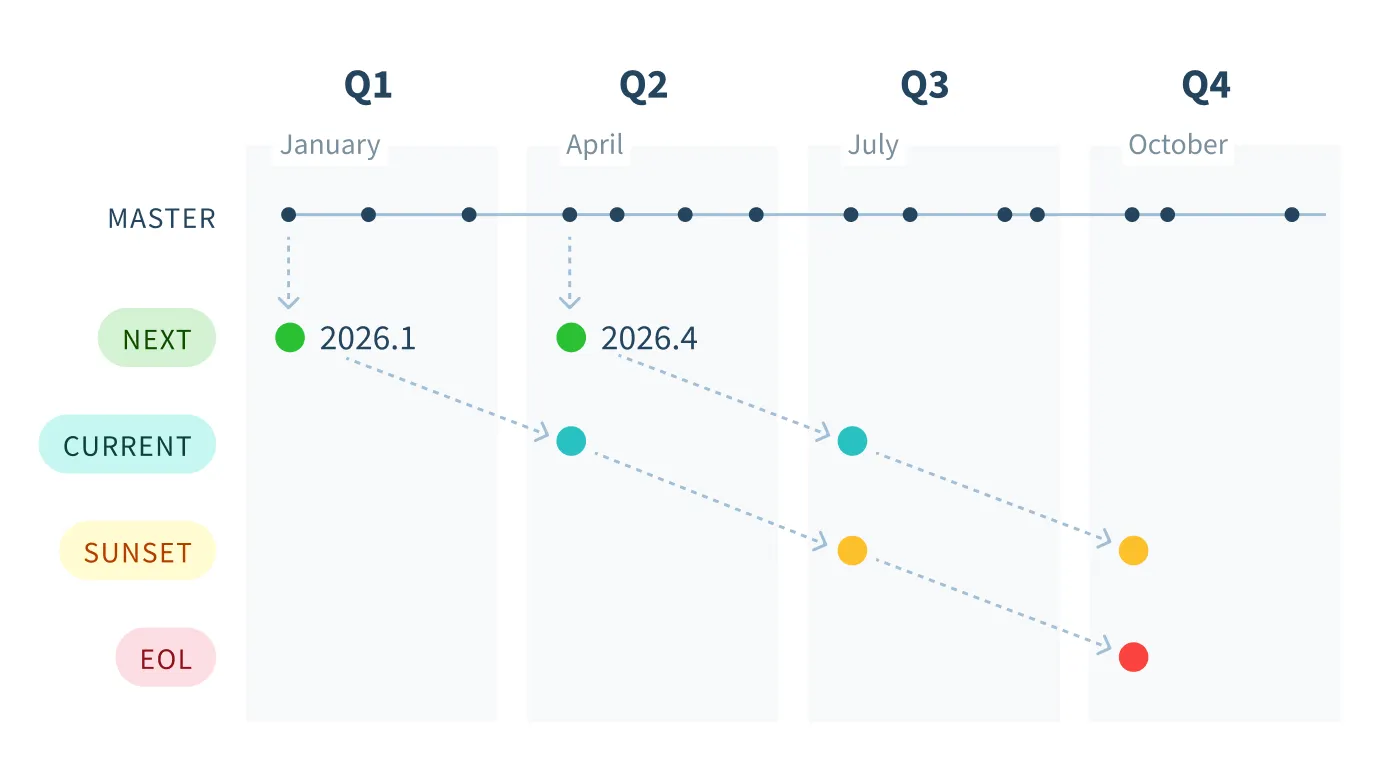
At any one time there are three supported lines of ESR versions, which we tag as *next*, *current*, and *sunset* based on their age, as shown in the diagram below. Every three months a new ESR version is released, which advances the ESR version tagged for each line, for example `2026.1` to `2026.4` below. At the same time, the tag for a particular ESR version transitions downward toward eventual end of life (EOL).
Let's walk through an example. In January 2026, at the beginning of Q1, the master branch of balenaOS is released as ESR version `2026.1` and tagged as *next* since it is the next ESR release. In three months a new ESR version, `2026.4`, is tagged as *next*, while the tag for `2026.1` transitions to *current*. Similarly, three months after that a new ESR version is released and `2026.1` is tagged as *sunset*. Finally in October, nine months after release, the `2026.1` ESR version is untagged, having reached its end of life. It will not receive further fixes. A user should perform a [self-service update](/reference/os/updates/self-service.md#running-an-update) to a newer supported ESR version by now for the ongoing benefits.
## Using an ESR host OS version
### Adding a new device
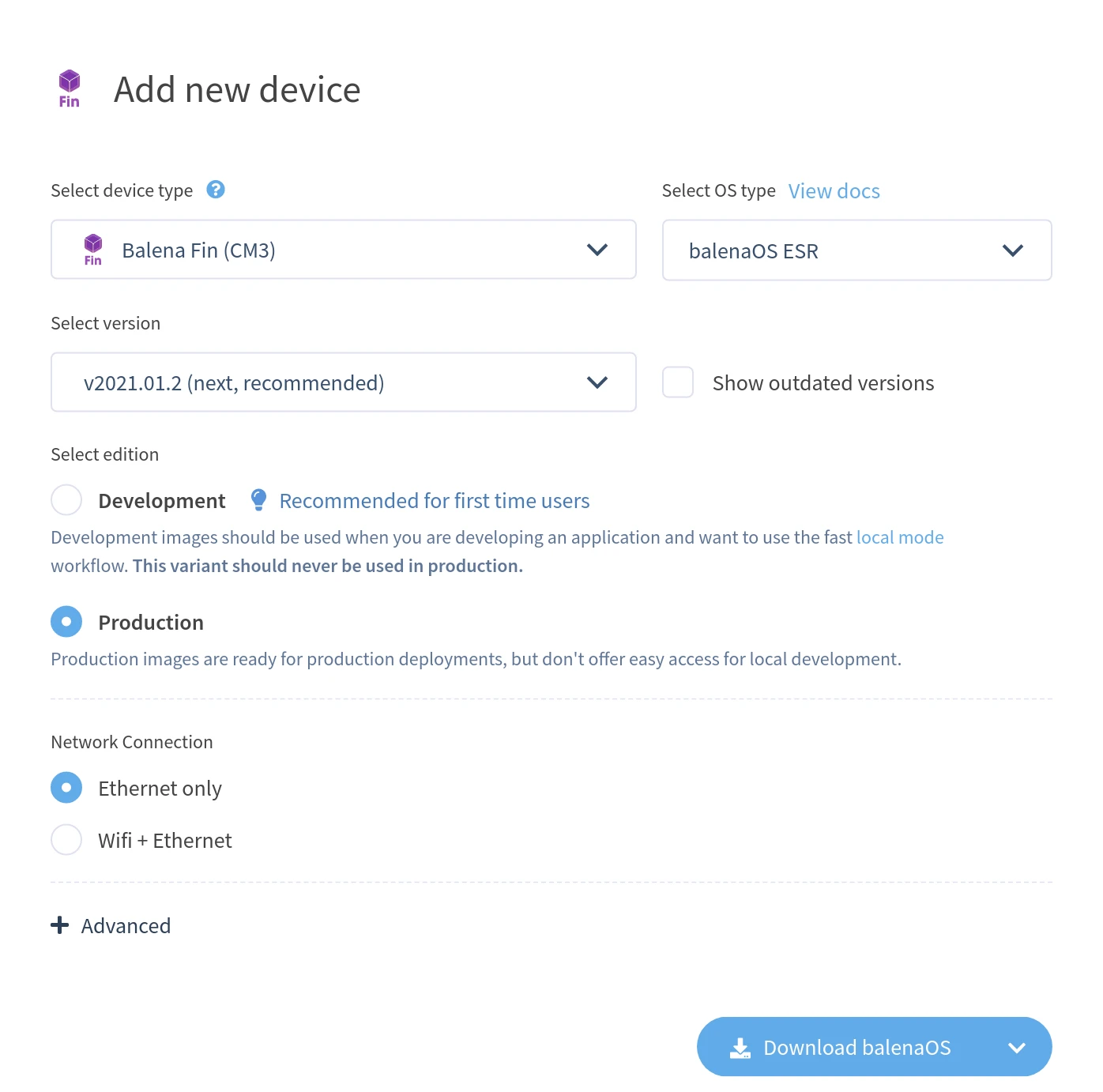
For new devices, if you are on a Production or Enterprise plan with a [supported device type](#supported-devices), when you add a new device, you will be given the option to *Select OS type* which defaults to *balenaOS ESR*. If you would like a non-ESR version, expand this dropdown and select *balenaOS* for the host OS type.
Next, select the ESR version as either *next*, *current*, or *sunset* if available. The *next* version is selected by default and offers at least six months (and up to nine months) of critical backports and fixes.
### Host OS update
For those users on a Production or Enterprise plan with an existing [supported device](#supported-devices), you can update to an ESR version via a [self-serve update](/reference/os/updates/self-service.md#running-an-update). You should select the *balenaOS ESR* host OS type and your chosen ESR version.
{% hint style="warning" %}
Once updated to an ESR version, it is not possible to update from an ESR host OS version to a non-ESR one.
{% endhint %}
## Supported devices
All device types are eligible for ESR, however they require a dedicated build and release pipeline so support needs to be requested via our [support channels](https://balena.io/support).
ESR host OS versions are currently available for the following devices:
| Logo | Device Name | Machine Name | Architecture | |
| :------------------------------------------------------------------------------------------------------------------------------------------------------------------------------------------------------------------------------------------------: | --------------------------------- | ---------------------- | ------------ | --------------------------------------------------------------- |
| | BeagleBone Black | beaglebone-black | armv7hf | [Get started](/learn/getting-started/beaglebone-black.md) |
| | Generic AARCH64 | generic-aarch64 | aarch64 | [Get started](/learn/getting-started/generic-aarch64.md) |
| | Generic x86\_64 (GPT) | generic-amd64 | amd64 | [Get started](/learn/getting-started/generic-amd64.md) |
| | Generic x86\_64 (legacy MBR) | genericx86-64-ext | amd64 | [Get started](/learn/getting-started/genericx86-64-ext.md) |
| | Intel NUC | intel-nuc | amd64 | [Get started](/learn/getting-started/intel-nuc.md) |
| | Nitrogen8M Mini SBC | nitrogen8mm | aarch64 | [Get started](/learn/getting-started/nitrogen8mm.md) |
| | Nvidia Jetson TX2 | jetson-tx2 | aarch64 | [Get started](/learn/getting-started/jetson-tx2.md) |
| | Raspberry Pi 3 | raspberrypi3 | armv7hf | [Get started](/learn/getting-started/raspberrypi3.md) |
| | Raspberry Pi 3 (using 64bit OS) | raspberrypi3-64 | aarch64 | [Get started](/learn/getting-started/raspberrypi3-64.md) |
| | Raspberry Pi 4 (using 64bit OS) | raspberrypi4-64 | aarch64 | [Get started](/learn/getting-started/raspberrypi4-64.md) |
| | Raspberry Pi 5 & CM5 | raspberrypi5 | aarch64 | [Get started](/learn/getting-started/raspberrypi5.md) |
| | Raspberry Pi CM4 IO Board | raspberrypicm4-ioboard | aarch64 | [Get started](/learn/getting-started/raspberrypicm4-ioboard.md) |
| | Raspberry Pi (v1 / Zero / Zero W) | raspberry-pi | rpi | [Get started](/learn/getting-started/raspberry-pi.md) |
| | ROCK Pi 4B | rockpi-4b-rk3399 | aarch64 | [Get started](/learn/getting-started/rockpi-4b-rk3399.md) |
| | UP Board | up-board | amd64 | [Get started](/learn/getting-started/up-board.md) |
---
# Agent Instructions
This documentation is published with GitBook. GitBook is the documentation platform designed so that both humans and AI agents can read, navigate, and reason over technical content effectively. Learn more at gitbook.com.
## Querying This Documentation
If you need additional information that is not directly available in this page, you can query the documentation by asking a question.
Perform an HTTP GET request on the following URL with the `ask` and `goal` query parameters:
```
GET https://docs.balena.io/reference/os/extended-support-release.md?ask=&goal=
```
`ask` is the immediate question: it should be specific, self-contained, and written in natural language.
`goal` is what the user is ultimately trying to achieve, the reason they need the answer. Sharing it helps GitBook give you a better, more relevant answer. A goal is most helpful when it describes the outcome the user wants rather than restating the question. For example, with `ask=how do I create an API token`, a goal like `automate deployments from our CI pipeline` lets GitBook tailor the answer to that use case.
The response will contain a direct answer to the question and relevant excerpts and sources from the documentation.
Use this mechanism when the answer is not explicitly present in the current page, you need clarification or additional context, or you want to retrieve related documentation sections.
 | BeagleBone Black | beaglebone-black | armv7hf | [Get started](/learn/getting-started/beaglebone-black.md) |
|
| BeagleBone Black | beaglebone-black | armv7hf | [Get started](/learn/getting-started/beaglebone-black.md) |
|  | Generic AARCH64 | generic-aarch64 | aarch64 | [Get started](/learn/getting-started/generic-aarch64.md) |
|
| Generic AARCH64 | generic-aarch64 | aarch64 | [Get started](/learn/getting-started/generic-aarch64.md) |
|  | Generic x86\_64 (GPT) | generic-amd64 | amd64 | [Get started](/learn/getting-started/generic-amd64.md) |
|
| Generic x86\_64 (GPT) | generic-amd64 | amd64 | [Get started](/learn/getting-started/generic-amd64.md) |
|  | Generic x86\_64 (legacy MBR) | genericx86-64-ext | amd64 | [Get started](/learn/getting-started/genericx86-64-ext.md) |
|
| Generic x86\_64 (legacy MBR) | genericx86-64-ext | amd64 | [Get started](/learn/getting-started/genericx86-64-ext.md) |
|  | Intel NUC | intel-nuc | amd64 | [Get started](/learn/getting-started/intel-nuc.md) |
|
| Intel NUC | intel-nuc | amd64 | [Get started](/learn/getting-started/intel-nuc.md) |
|  | Nitrogen8M Mini SBC | nitrogen8mm | aarch64 | [Get started](/learn/getting-started/nitrogen8mm.md) |
|
| Nitrogen8M Mini SBC | nitrogen8mm | aarch64 | [Get started](/learn/getting-started/nitrogen8mm.md) |
|  | Nvidia Jetson TX2 | jetson-tx2 | aarch64 | [Get started](/learn/getting-started/jetson-tx2.md) |
|
| Nvidia Jetson TX2 | jetson-tx2 | aarch64 | [Get started](/learn/getting-started/jetson-tx2.md) |
|  | Raspberry Pi 3 | raspberrypi3 | armv7hf | [Get started](/learn/getting-started/raspberrypi3.md) |
|
| Raspberry Pi 3 | raspberrypi3 | armv7hf | [Get started](/learn/getting-started/raspberrypi3.md) |
|  | Raspberry Pi 3 (using 64bit OS) | raspberrypi3-64 | aarch64 | [Get started](/learn/getting-started/raspberrypi3-64.md) |
|
| Raspberry Pi 3 (using 64bit OS) | raspberrypi3-64 | aarch64 | [Get started](/learn/getting-started/raspberrypi3-64.md) |
|  | Raspberry Pi 4 (using 64bit OS) | raspberrypi4-64 | aarch64 | [Get started](/learn/getting-started/raspberrypi4-64.md) |
|
| Raspberry Pi 4 (using 64bit OS) | raspberrypi4-64 | aarch64 | [Get started](/learn/getting-started/raspberrypi4-64.md) |
|  | Raspberry Pi 5 & CM5 | raspberrypi5 | aarch64 | [Get started](/learn/getting-started/raspberrypi5.md) |
|
| Raspberry Pi 5 & CM5 | raspberrypi5 | aarch64 | [Get started](/learn/getting-started/raspberrypi5.md) |
|  | Raspberry Pi (v1 / Zero / Zero W) | raspberry-pi | rpi | [Get started](/learn/getting-started/raspberry-pi.md) |
|
| Raspberry Pi (v1 / Zero / Zero W) | raspberry-pi | rpi | [Get started](/learn/getting-started/raspberry-pi.md) |
|  | ROCK Pi 4B | rockpi-4b-rk3399 | aarch64 | [Get started](/learn/getting-started/rockpi-4b-rk3399.md) |
|
| ROCK Pi 4B | rockpi-4b-rk3399 | aarch64 | [Get started](/learn/getting-started/rockpi-4b-rk3399.md) |
|  | UP Board | up-board | amd64 | [Get started](/learn/getting-started/up-board.md) |
---
# Agent Instructions
This documentation is published with GitBook. GitBook is the documentation platform designed so that both humans and AI agents can read, navigate, and reason over technical content effectively. Learn more at gitbook.com.
## Querying This Documentation
If you need additional information that is not directly available in this page, you can query the documentation by asking a question.
Perform an HTTP GET request on the following URL with the `ask` and `goal` query parameters:
```
GET https://docs.balena.io/reference/os/extended-support-release.md?ask=
| UP Board | up-board | amd64 | [Get started](/learn/getting-started/up-board.md) |
---
# Agent Instructions
This documentation is published with GitBook. GitBook is the documentation platform designed so that both humans and AI agents can read, navigate, and reason over technical content effectively. Learn more at gitbook.com.
## Querying This Documentation
If you need additional information that is not directly available in this page, you can query the documentation by asking a question.
Perform an HTTP GET request on the following URL with the `ask` and `goal` query parameters:
```
GET https://docs.balena.io/reference/os/extended-support-release.md?ask=